
Transit-Time Ultrasonic

Burkert 561864 Type 8026 insertion flowmeter with paddle wheel. Features 14-36 V DC supply, 3 configurable outputs, PVDF sensor, and display module.
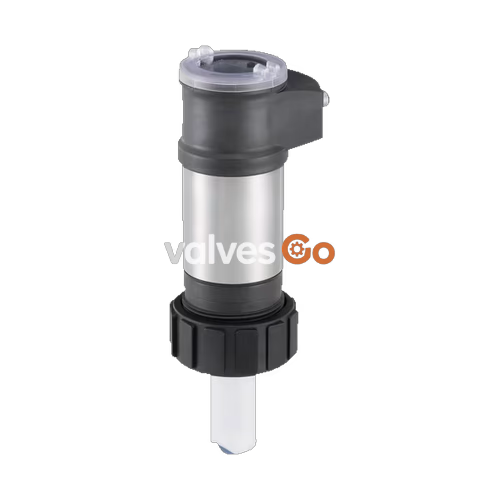
Burkert 561864 Type 8026 is an insertion flowmeter with a paddle wheel and ELEMENT design, engineered for measuring the flow rate of particle-free liquids. Compatible with Bürkert Type S020 insertion fittings, it supports pipe diameters from DN 20 to DN 400. The device operates at a maximum pressure of PN 10 and handles fluid temperatures from -15 °C to 100 °C. This specific model features a 14-36 V DC power supply, a short PVDF sensor, and three configurable outputs (two NPN/PNP transistor outputs and one 4-20 mA current output). It includes a removable display/configuration module with backlighting for showing flow rate and volume across two totalizers.
When liquid flows through the pipe, the paddle wheel with 4 inserted magnets is set in rotation, producing a measuring signal in the Hall sensor. The frequency-modulated induced voltage is proportional to the flow velocity of the fluid. A K-factor, specific to each pipe, enables the conversion of this frequency into a flow rate or volume.

The device is constructed with materials suitable for neutral or slightly aggressive fluids. The wetted parts include a PVDF sensor armature and paddle wheel, ceramic (Al2O3) axis and bearing, and FKM seals.
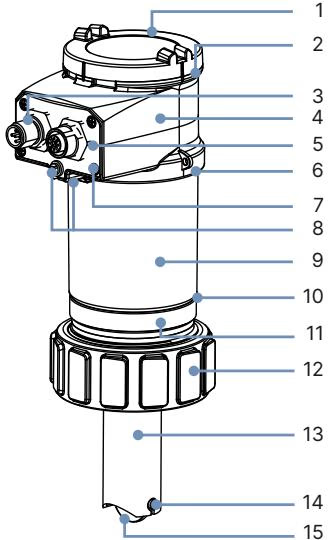
| No. | Element | Material |
|---|---|---|
| 1 | Cover | PC |
| 2 | Seal | Silicone |
| 3 | Circular connector (female/male M12) | Nickel-plated brass |
| 4 | Housing (top) | PPS |
| 5 | Connector holder | PPS CF30 |
| 6 | Seal | EPDM |
| 7 | Screws | Stainless steel 1.4301 (304) |
| 8 | Grounding terminal and screw | Stainless steel 1.4401 (316) |
| 9 | Housing (body) | Stainless steel |
| 10 | Seal | EPDM |
| 11 | Housing (base) | PPS |
| 12 | Union nut | PC |
| 13 | Sensor armature | PVDF |
| 14 | Axis and bearing | Ceramics (Al2O3) |
| 15 | Paddle wheel | PVDF |
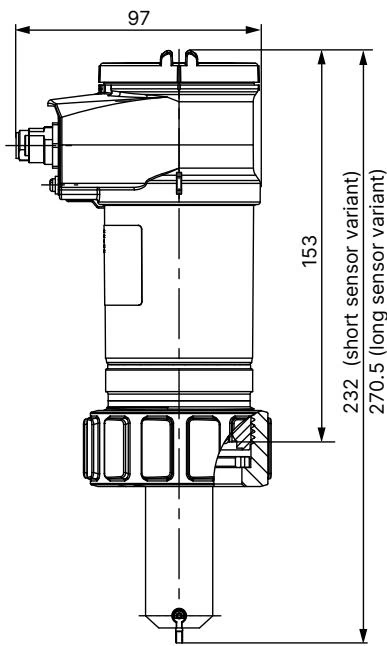
The length of the flow probe depends on the used Insertion fitting Type S020 and its nominal diameter.
WARNING
The device is not suitable for use in gaseous media and steam. The maximum rate of solid particles is 1%, with a maximum particle size of 0.5 mm.
Minimum straight distances upstream and downstream of the sensor must be observed to ensure calm flow conditions. These stabilizing distances depend on the pipe's design. Increasing these distances or installing a flow conditioner may be necessary to obtain the best accuracy (refer to EN ISO 5167-1).
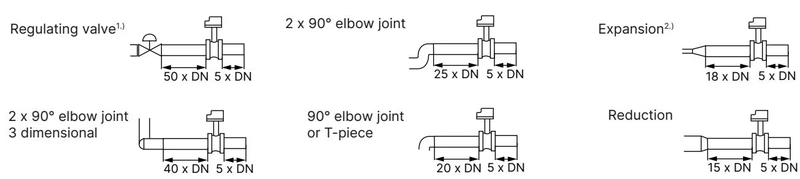
The device can be installed in either horizontal or vertical pipes, provided the following conditions are met:
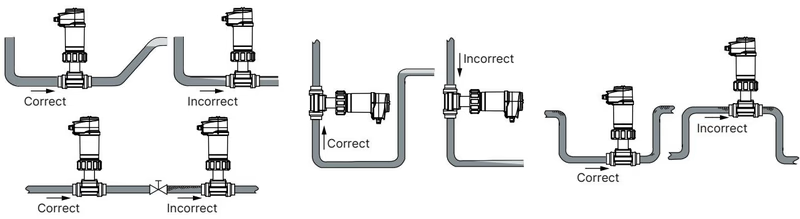
TIP
Install the fitting in the pipe so that the paddle wheel axis of the device is horizontal to ensure optimal measurement accuracy.
The 561864 model features 3 configurable outputs (2 transistor outputs NPN/PNP and 1 current output 4-20 mA, 2-wire) connected via a 5-pin M12 male connector.
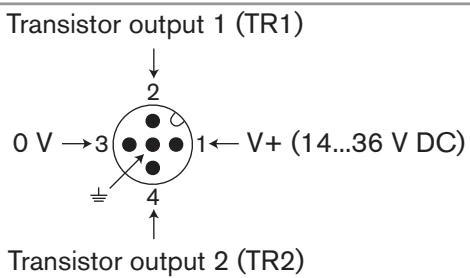
| Pin (M12 connector) | Wire Color |
|---|---|
| 1 | Brown |
| 2 | White |
| 3 | Blue |
| 4 | Black |
| 5 | Green/Yellow or Grey |
To ensure the equipotentiality of the installation, connect together the various earth spots to eliminate potential differences. If the device is installed on plastic pipes, earth together the metallic equipment (such as pumps or valves) as close as possible to the device.
The removable display/configuration module features a grey dot matrix 128 × 64 screen with backlighting. It is required for device configuration, including setting parameters, configuring displayed information, entering access codes, and performing automatic calibration via Teach-In. The device operates normally without the display module once configured.
Explore similar products in our catalog